CodeMenu 1.7 makes your snippet library more useful
CodeMenu 1.7 is a release about getting more value out of the snippets you already have. Storing code is only half of the job. The harder part is finding the right thing at the right moment, reusing it in a way that fits your current work, and connecting your library to the rest of your workflow. This update pushes that side of the app forward with snippet-aware AI, better automation hooks, iCloud sync, and more integration features across macOS.
Chat with your snippet library
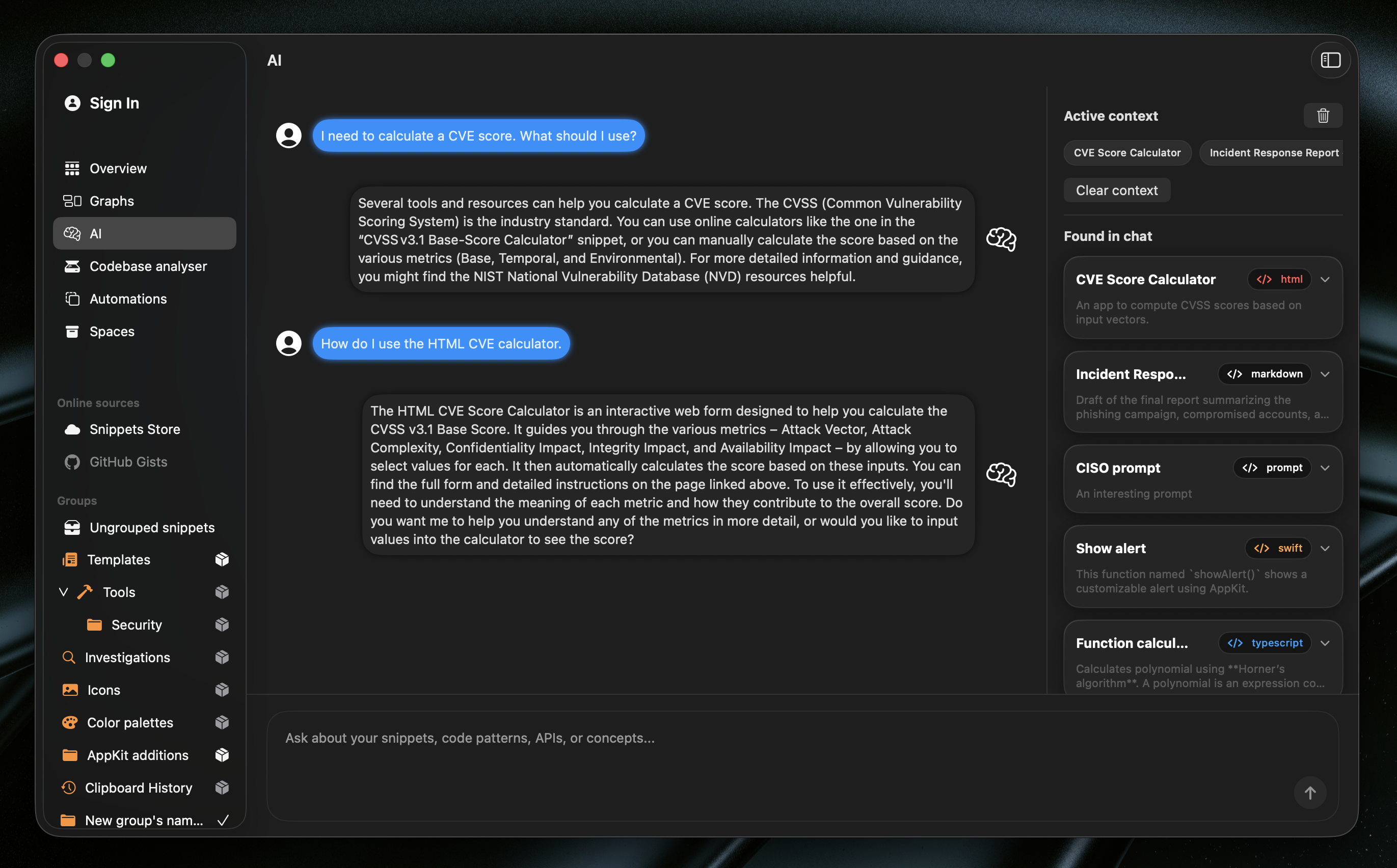
One of the biggest changes in CodeMenu 1.7 is the new snippet-aware AI workflow. In the side window, AI mode can now search through your library while it responds. There is also a dedicated AI view in the Dashboard, so these conversations no longer have to feel like a small side feature tucked away in another panel.
What makes this useful is not just that there is an AI prompt inside the app. The AI can actively pull snippets into the conversation, keep track of what it is currently using as context, and surface snippets it found during the chat. That turns CodeMenu into something closer to a searchable working memory for your code.
The practical use cases are easy to imagine. You might remember that you solved a tricky API problem a few months ago, but not what you called the snippet or where you filed it. You can describe the behavior instead of guessing keywords. You can ask the AI to compare two saved approaches before you reuse one. You can start from an old snippet and ask for a refactor, a cleaner version, or an explanation of how it works. You can also use it when you know you have solved something before, but the details are gone from your head.
Ollama support for integrated AI
CodeMenu 1.7 also expands the local AI story by adding Ollama as an integrated provider. In settings, local AI is no longer limited to the built-in path. You can choose between the built-in local model and Ollama, point CodeMenu at an Ollama endpoint, pick an installed model, or enter a model manually.
That matters because local AI setups are not one-size-fits-all. Some people want the simplest built-in experience. Others already run Ollama and want their existing models to do the work. With this release, CodeMenu is more flexible about that choice while keeping the experience inside the app.
In practice, this means you can keep snippet-aware AI closer to your own machine and your own stack. If you already use Ollama for development work, you do not have to treat CodeMenu as a separate island. If you prefer a specific local model for speed or style, CodeMenu can fit into that setup instead of forcing you into a single path.
Shortcuts app support
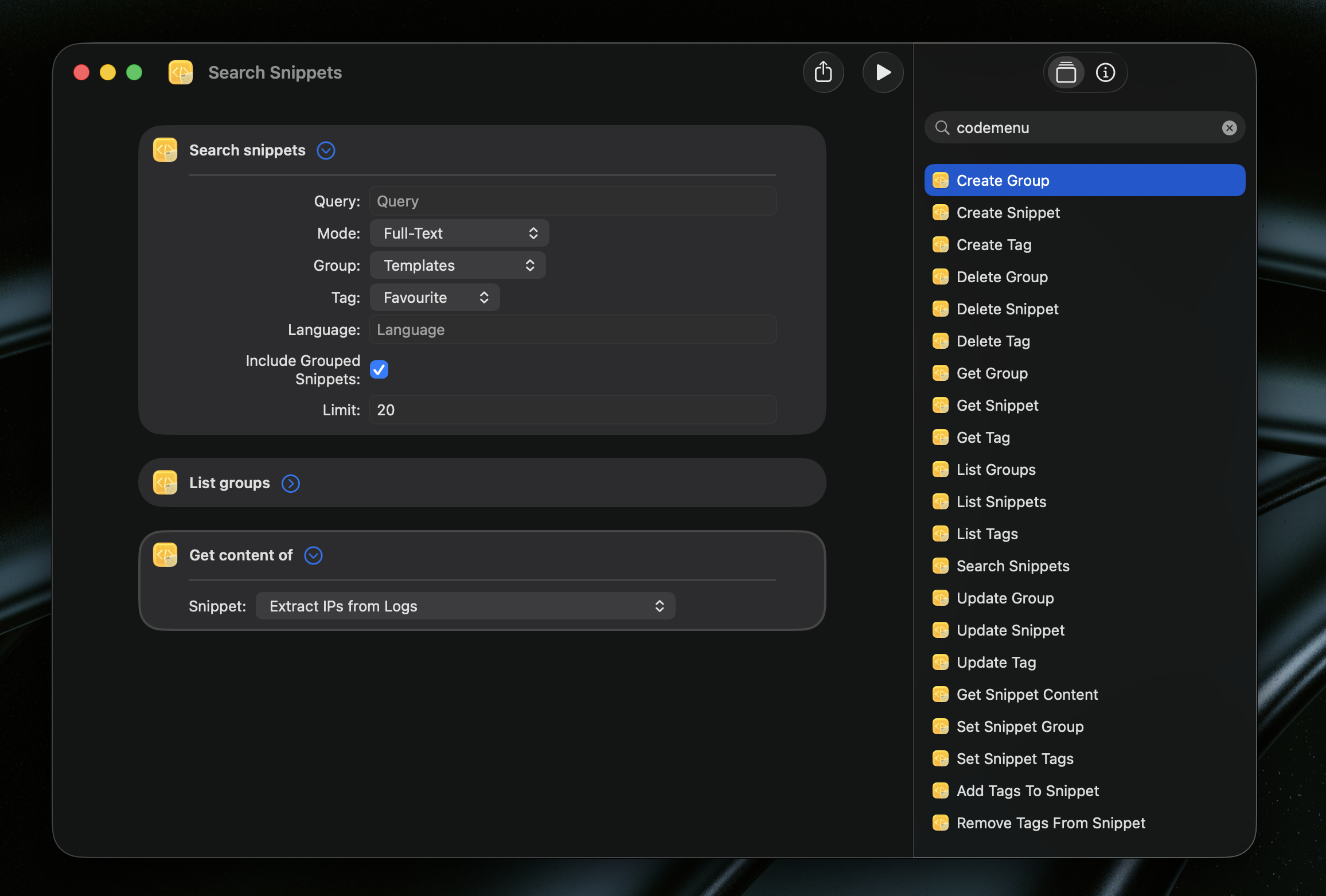
CodeMenu 1.7 now supports the Shortcuts app through App Shortcuts and App Intents for snippets, tags, and groups. That includes actions for creating snippets, searching snippets, listing snippets, creating tags, creating groups, and moving snippets into groups.
This is an important step because snippet management becomes much more powerful once it can participate in system automation. A snippet manager should not only wait for you to open it. It should also be able to respond to the way you already work on macOS.
There are a lot of practical directions this can go. You can capture a snippet from a Shortcut built around selected text, browser content, or clipboard data. You can create voice-driven or menu bar flows for organizing your library. You can build personal automations that drop incoming material into the right group or tag structure. For people who like connecting apps together, CodeMenu is now a much better citizen of the broader macOS workflow.
iCloud synchronization
Another major addition in 1.7 is iCloud synchronization. CodeMenu now includes iCloud-based sync infrastructure.
This is the kind of feature that disappears when it works well, which is usually a good sign. If you use CodeMenu on more than one Mac, the value is immediate. Your snippets and related library data are no longer tied to one machine and one local state. You can move from a work Mac to a personal Mac, or from a desktop setup to a laptop, without treating export and import as part of the routine.
For a tool that is meant to act like an external memory, that matters a lot. The less friction there is between your machines, the easier it is to trust the library as the place where things live.
Better HTTP server integrations
CodeMenu 1.7 also improves the built-in HTTP server with new GET /v1/snippet and POST /v1/snippet endpoints. That sounds small on paper, but it makes integrations much more practical when another tool only needs to work with one specific snippet at a time or wants to create a new one directly.
The value here is simplicity. Companion tools, editor helpers, and lightweight scripts usually do not want to pull an entire list and filter it themselves when all they need is one result. They also benefit from being able to create a snippet in a single request when something useful appears elsewhere in your workflow.
That opens up cleaner ways to wire CodeMenu into other developer tools. A helper can fetch one exact snippet by ID. A script can create a new snippet from generated output, captured text, or another app’s result. The HTTP server becomes a little more composable, which usually means it becomes a lot more usable.
Smaller improvements
There are a few smaller changes worth mentioning too. Deleting a parent group now removes its subgroups as well, which makes nested organization behave much more predictably. The preferences window resizing behavior has been cleaned up so it stays anchored more naturally. The side window header has also received polish for light mode, which helps one of CodeMenu’s most frequently used surfaces feel more consistent.
This release also continues the move away from the older utilities window. That part of the app is being deprecated and is no longer where the product direction is headed. The emphasis is now much more clearly on the main snippet workflows, integrated AI, automation, and the surfaces people use every day.
CodeMenu 1.7 is a focused release, but it moves the app in an important direction. If you already have a library of snippets inside CodeMenu, this is a good time to revisit it. The app is getting better at helping you search it, talk to it, automate around it, and carry it with you across the rest of your setup.